WIP Reports for Contractors (Work-in-Progress)
A WIP report (work-in-progress report) is a job-by-job schedule that compares each open contract's costs to date, percent complete, revenue earned and amount billed, showing whether each job is overbilled or underbilled. It helps contractors catch money-losing jobs and cash gaps before a job ends, and lenders and bonding companies often ask to see it.
A roofing contractor with a $200,000 job that has spent $60,000 of an estimated $150,000 cost is 40% complete and has earned $80,000, so billing $95,000 so far means the job is overbilled by $15,000.
 Expenses
Quick answer: A WIP report construction teams rely on tracks the revenue earned to date against the costs incurred and the amount billed on each active job, so you can see instantly whether a project is over-billed or under-billed. Most contractors pull one monthly, using the percentage-of-completion method, and treat it as the single source of truth for job profitability before a shortfall shows up in cash flow.
Without one, a job can look fine on the invoice while the crew quietly burns through the budget in the field. The gap between what you have billed and what you have actually earned is exactly where WIP reporting either catches a problem early or lets it fail quietly.
What Is a WIP Report in Construction?
A work-in-progress (WIP) report is a job-by-job snapshot that compares earned revenue, actual costs, and billings on every active contract. Earned revenue is calculated with the percentage-of-completion method: costs incurred to date divided by total estimated project cost, multiplied by the total contract value.
That single formula tells you what you should have billed at this point in the job. Compare it to what you actually invoiced and you get one of two results.
Over-billing means you have invoiced more than the work performed justifies, which inflates current cash but creates a liability you will have to work off later. Under-billing means the crew has done more work than you have billed for, which starves cash flow even though the job is profitable on paper.
Why Over-Billing and Under-Billing Happen Without a WIP Report
Most WIP gaps trace back to slow, manual cost capture, not bad estimating. A crew member pays for materials with a personal card, the receipt sits in a truck for two weeks, and the cost never makes it into the job file before the next invoice goes out.
By the time bookkeeping catches up, the project's real position is a month old. That lag is the single biggest reason WIP schedules drift from reality on active sites, and it is why expense management for construction crews needs to happen closer to the moment of spend, not at month-end. Many finance teams first turn to a construction expense tracker to start closing that gap before it shows up in the numbers.
Change orders that never get logged cause the same problem from the other direction: the crew does the extra work, but nobody updates the contract value, so earned revenue looks lower than the job actually deserves.
How to Build a WIP Report Construction Teams Can Trust
A reliable WIP report needs the same seven fields for every job, updated on the same cadence, usually monthly and always before you send new invoices.
| Field | What it captures |
|---|---|
| Contract value | Total revenue the job will generate, including approved change orders |
| Estimated total cost | Full budgeted cost to complete the job |
| Costs to date | Actual cost posted against the job so far |
| Percent complete | Costs to date divided by estimated total cost |
| Earned revenue | Percent complete multiplied by contract value |
| Billed to date | Total amount invoiced on the job |
| Over/(under) billing | Billed to date minus earned revenue |
The report only holds up if costs to date are accurate on the day you pull it. That means every card swipe, receipt, and vendor bill needs to be coded to the right job before, not after, the report gets built. Clean reports and exports pulled straight from coded transactions make this step far less painful than reconciling a spreadsheet by hand.
The Work-in-Progress Schedule: Key Numbers to Track
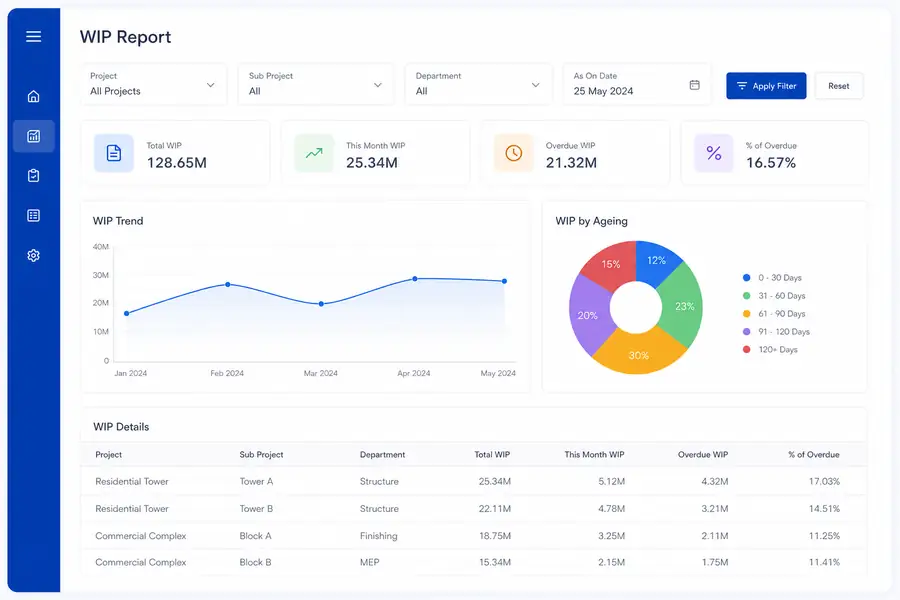
A work in progress schedule is another name for the same report: every active contract listed in rows, with the same seven columns running across, refreshed on the same cycle. Controllers use it to spot patterns that looking at one job at a time would hide, like one crew consistently under-billing because field costs post late.
The schedule is also where WIP data feeds job costing directly. If costs to date are wrong, both the WIP schedule and the underlying job costing numbers are wrong in the same direction, which is why the two should pull from one shared set of coded transactions rather than separate spreadsheets.
A ten-person crew running two or three jobs can manage this schedule in a shared spreadsheet. Past that, tracking it manually across a dozen active jobs is where errors and stale data start showing up every month.
Common WIP Report Mistakes That Distort Job Costing
Most WIP inaccuracies come from a short list of repeatable mistakes, not one-off errors.
- Coding costs to the wrong job: a mixed material run gets logged under one contract instead of split across two, skewing both jobs' percent complete.
- Ignoring approved change orders: the crew builds the extra scope but the contract value never updates, so the job looks over-billed when it is not.
- Estimating total cost once and never revisiting it: a budget set at bid time stops reflecting real conditions once change orders and price increases hit.
- Batching receipts at month-end: costs from three weeks ago post after the WIP report is already pulled, so the numbers are stale before anyone reads them.
- Treating retainage as billed revenue: retainage held back by the client should not count toward billed-to-date until it is actually released.
How Clyr Simplifies WIP Reporting for Field Crews
Clyr closes the gap that causes most WIP drift: the time between a field expense happening and that cost landing on the right job. Clyr connects the cards a business already has and captures receipts and job codes at the moment of the swipe, instead of weeks later when someone finally turns in paper.
That data syncs to QuickBooks in real time, so costs to date in your accounting system match what is actually happening on site, and your WIP report reflects current reality rather than last month's paperwork. For a finance team pulling WIP schedules across a dozen active jobs, that single change removes most of the manual chasing that makes the report unreliable in the first place.
If your WIP reports are consistently a few weeks behind the field, book a demo to see how Clyr keeps job costs current without adding work for your crews.
FAQs
What is a WIP report in construction?
A WIP (work-in-progress) report is a job-by-job comparison of earned revenue, actual costs, and amounts billed on active construction contracts. It shows whether a project is over-billed or under-billed at a given point in time, using the percentage-of-completion method to calculate what should have been invoiced so far.
How often should contractors run a WIP report?
Most contractors run a WIP report monthly, timed to close before new invoices go out. Companies with tight cash flow or many active jobs sometimes pull it every two weeks so over-billing and under-billing get caught sooner.
What causes under-billing on a construction job?
Under-billing happens when the work completed and costs incurred outpace what has actually been invoiced, usually because change orders were not billed promptly or the contract value was never updated. It starves cash flow even on jobs that are profitable overall, because the company has effectively financed work the client has not paid for yet.
What is the difference between a WIP report and a work in progress schedule?
They are two names for the same report. Both list every active job with its earned revenue, costs, and billing status side by side, which lets a controller compare billing accuracy and job costing trends across the whole project list at once.
Can WIP reporting be automated?
Yes. Automating WIP reporting means coding receipts, card spend, and vendor bills to the correct job as the cost happens, then syncing that data directly to accounting software, so the report pulls current numbers instead of relying on someone reconciling spreadsheets after the fact.