Concur vs Expensify: Full Comparison
 Expenses
SAP Concur and Expensify solve expense management for very different company sizes, and most of the confusion around concur vs expensify comes from treating them as interchangeable. SAP Concur is a travel and expense suite built for large, multi-entity organizations with dedicated finance teams and complex approval policies. Expensify is a lighter expense tracking app built for small and mid-size teams that want receipt capture and reimbursement without months of setup. Neither is a drop-in replacement for the other: picking one based on name recognition alone usually means paying for enterprise features you won't use, or outgrowing a tool within a year of signing the contract.
The sap concur vs expensify decision usually comes up in one of two situations: a company choosing its first real expense tool, or a subsidiary that inherited Concur from a parent company and wants something lighter for its own books. The table below breaks down where each one actually differs.
SAP Concur vs Expensify at a Glance
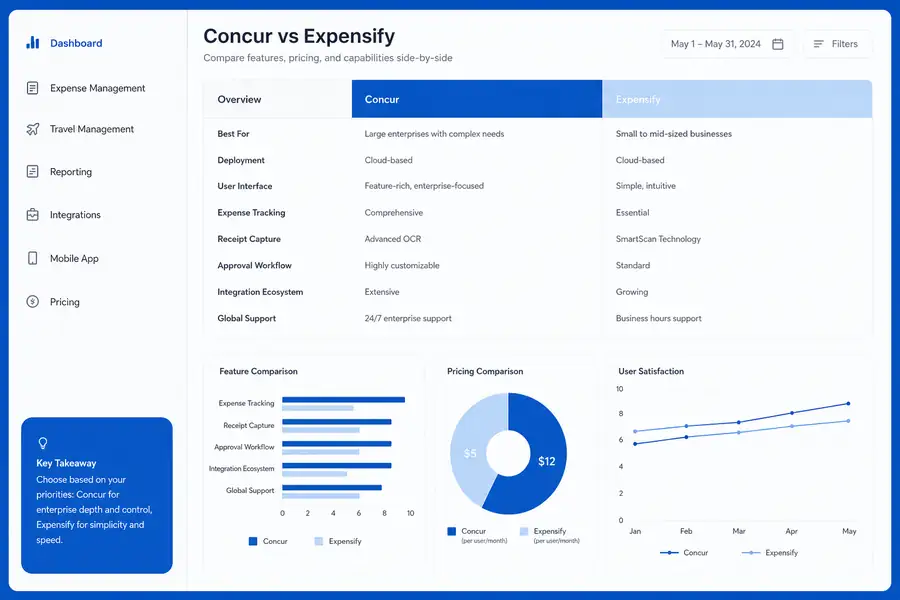
SAP Concur and Expensify differ most on company size fit, pricing model, and how deeply each one handles travel versus simple reimbursement. The table below covers the attributes that actually decide which one fits a given team.
| Feature | SAP Concur | Expensify |
|---|---|---|
| Best fit company size | Mid-market to enterprise, 200+ employees | Small to mid-size teams, under 200 employees |
| Pricing model | Custom quote, negotiated per-user tiers | Published per-user monthly plans |
| Receipt capture | Mobile app with OCR, tied to travel | Mobile app with OCR (SmartScan), standalone |
| Travel booking | Built in, with policy enforcement at booking | Not included, expense tracking only |
| Accounting integrations | NetSuite, SAP, Workday, custom ERP connectors | QuickBooks, Xero, NetSuite |
| Approval workflows | Multi-level, policy-driven, configurable | Rule-based, simpler approval chains |
| Implementation time | Weeks to months, usually needs an admin | Days, self-serve setup |
| Support | Dedicated account manager on enterprise plans | Email and chat support |
SAP Concur: Strengths and Limitations for Smaller Teams
What SAP Concur does well
SAP Concur handles complex, multi-entity travel programs better than almost any competing tool, because it combines travel booking, policy enforcement at the point of purchase, and expense reporting in one system. Large companies use it to block an out-of-policy flight before it's ever booked and to route approvals across multiple cost centers and currencies. Enterprise plans come with a dedicated account manager, which matters for a company running Concur across several subsidiaries.
Where SAP Concur falls short
That same depth is a liability for a 30-person company. Implementation routinely takes weeks because someone has to configure policy rules, approval chains, and entity structures before the first report runs through it. Pricing is quoted through a sales contract rather than posted anywhere, which makes it hard to budget against a simpler per-user plan. Teams without a dedicated finance administrator often find the admin panel more complex than the problem it's solving.

Expensify: Strengths and Limitations for Growing Teams
What Expensify does well
Expensify's SmartScan OCR reads a photographed receipt and fills in the vendor, date, and amount in seconds, which is the main reason small teams adopt it over spreadsheets. Setup is self-serve: a company can be running expense reports within days instead of weeks, and the per-user pricing is published rather than negotiated. For a broader look at how its receipt capture stacks up against other tools on the market, see this comparison of the best receipt management companies for 2026.
Where Expensify falls short
Expensify was not built for complex approval hierarchies or job-level cost allocation, so companies that need to route an expense through four approvers or split it across multiple properties or job codes tend to hit friction. It also has no built-in travel booking, so policy enforcement happens after the fact during expense review rather than at the point of purchase.
Concur vs Expensify: Which One Fits a Growing Company?
A company under about 200 employees with no dedicated travel program almost always fits Expensify better, because the setup cost and approval complexity of SAP Concur solve problems that team doesn't have yet. A company with multiple subsidiaries, negotiated airfare contracts, and a controller's office that needs policy enforced before the trip is booked tends to outgrow Expensify and needs Concur's travel and policy layer instead. If you're mapping out requirements before you commit to either one, this ultimate guide to small business expense management software walks through the criteria that matter most at that size.
The mistake most SMB buyers make is choosing based on brand recognition in finance circles rather than matching the tool to current headcount and approval complexity. A ten-person company paying for Concur's enterprise tier is paying for travel booking and policy automation it has no use for yet.
Where Clyr Fits If Neither Tool Solves the Real Problem
Companies with spend happening in the field, construction crews buying materials on a job site, property managers paying vendors across a dozen buildings, often find that neither Concur's travel focus nor Expensify's basic reimbursement flow matches how their spend actually happens. Clyr's expense management software pairs corporate cards with real-time receipt capture, so a purchase gets coded to the right job or property the moment it happens instead of sitting in a report until month-end.
For teams specifically outgrowing Expensify's manual categorization and flat approval chain, Clyr works as a direct Expensify alternative built around card controls and automatic QuickBooks sync rather than after-the-fact report submission. If you want to see how that workflow compares to what you're running today, you can book a demo.
FAQs
Is SAP Concur too big for a small business?
For most companies under a few hundred employees, yes. SAP Concur's pricing requires a sales quote, its implementation often takes weeks, and its deepest value comes from built-in travel booking and multi-entity policy management that smaller companies rarely need.
Does Expensify integrate with QuickBooks?
Yes, Expensify connects to QuickBooks Online and QuickBooks Desktop, along with Xero and NetSuite, so approved expenses can sync to the general ledger without manual re-entry. The integration handles basic coding well, though it still relies on someone reviewing and approving each report before it syncs.
What is the main pricing difference between Concur and Expensify?
Expensify is typically priced per user per month on published plans, while SAP Concur is sold through custom, negotiated contracts that are not listed publicly. Posted per-user pricing suits a company that wants to self-serve, while a custom contract suits one with a procurement team used to negotiating software deals.
Is there a better option for construction or field service teams than Concur or Expensify?
Teams with crews spending on job sites often need real-time card controls and automatic job costing that neither tool was built around first. Clyr focuses on that use case directly, syncing card spend and receipts to the right job as they happen rather than waiting for an end-of-cycle report.
Can I switch from Expensify without losing historical expense data?
Most switches preserve historical data through a CSV or report export from Expensify, which you can keep for recordkeeping even if the new tool doesn't import it directly. The true system of record is usually your accounting software, so reconciled data in QuickBooks or NetSuite typically survives the switch regardless of which expense tool you move to.