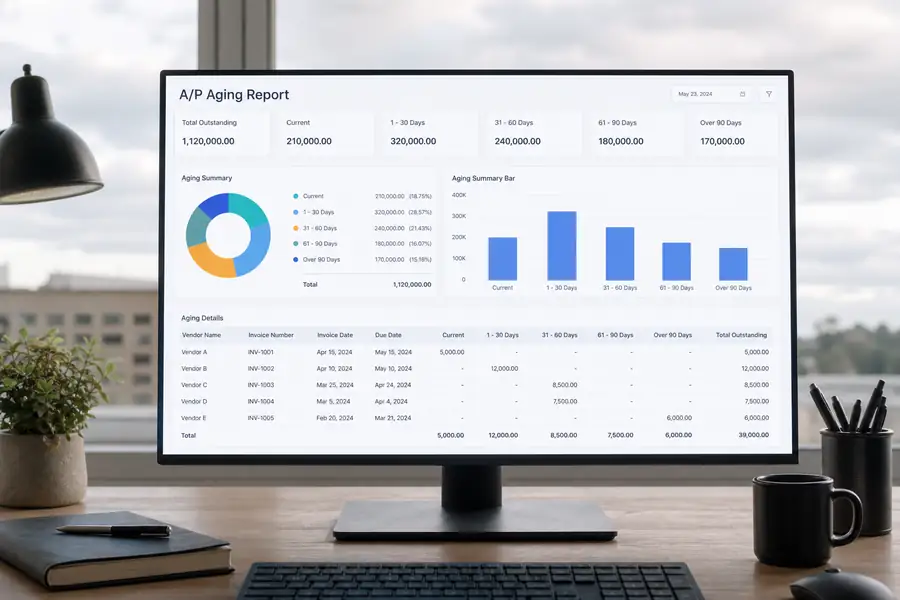
Quick answer: An AP aging report is a financial document that lists every unpaid vendor invoice a business owes, grouped by how long each one has been outstanding, typically in 30-day buckets: current, 1-30, 31-60, 61-90, and 90-plus days past due. It shows accounts payable teams exactly what's overdue and to whom.
Most accounting systems generate an accounts payable aging report automatically once invoices are entered and marked unpaid. The hard part isn't producing the report, it's reading it correctly and acting on it before a vendor relationship or a credit line takes the hit. The report turns a pile of invoices into a ranked list of what needs paying first.
What an AP Aging Report Shows (with Example)
An AP aging report sorts every open invoice into an aging bucket based on its due date, not its invoice date. A bill due 45 days ago sits in the 31-60 day column even if it was issued three months ago. That distinction matters because due date, not invoice date, is what determines whether a vendor considers you late.
Here's a basic example for a mid-sized contractor with five open vendor invoices:
| Vendor | Invoice # | Amount | Days Overdue | Aging Bucket |
|---|---|---|---|---|
| Riverbend Supply | 4021 | $3,200 | 0 | Current |
| Coastal Electric | 1187 | $1,450 | 18 | 1-30 days |
| Apex Rentals | 0092 | $6,800 | 42 | 31-60 days |
| Delta Concrete | 3345 | $2,100 | 75 | 61-90 days |
| Union Freight | 5501 | $980 | 110 | 90+ days |
Reading down that table, a controller can see that Union Freight and Delta Concrete need attention before Coastal Electric, even though the Coastal invoice arrived more recently. That's the whole point of an accounts payable aging report: it ranks urgency, not chronology.
How to Read an Accounts Payable Aging Report
Each aging bucket signals a different level of risk, and treating them all the same is the most common way a small delay turns into a real problem. Current and 1-30 day invoices are normal operating activity. Invoices sitting in the 31-60 day bucket usually mean a payment run was missed or a dispute is unresolved. Anything past 90 days typically means a vendor has stopped extending normal terms and started calling.
Total dollar value per bucket matters as much as invoice count. A report with twenty small invoices in the 1-30 bucket is healthier than one with three large invoices sitting past 90 days, even if the invoice counts look similar. Most controllers track the percentage of total payables sitting past 60 days as the key health metric, and a rising trend there is an early warning of a cash flow problem, not just a paperwork backlog.

Why an AP Aging Report Matters for Cash Flow
An AP aging report matters because it's the earliest warning system a finance team has for vendor relationship damage and missed early-payment discounts. Vendors left unpaid past 60 or 90 days often tighten credit terms, which forces a business onto prepayment or cash-on-delivery, squeezing cash flow exactly when flexibility matters most.
The stakes shift by business type. A property manager juggling payables across a dozen buildings needs the aging report split by property, not just by vendor, or a repair invoice can quietly age past 90 days on one building while the portfolio looks fine in aggregate. That per-property visibility problem is covered in more depth in this guide to streamlining accounts payable for property managers. Construction firms face a similar issue when unpaid subcontractor invoices sit past due on one job while the company's overall AP looks current.
Common Mistakes Teams Make with AP Aging Reports
The most frequent AP aging mistakes come from treating the report as a static snapshot instead of a working document that gets checked weekly. A report pulled once a month misses the two or three weeks where an invoice quietly slides from 31-60 days into 61-90.
- Aging by invoice date instead of due date: this understates how overdue a bill actually is and delays action.
- Ignoring disputed invoices: a disputed line item sits in the aging report like any other bill, so it needs a separate flag or it gets paid or ignored by mistake.
- No owner assigned per vendor: without a named person responsible for each overdue invoice, aging buckets fill up and nobody moves first.
- Manual re-entry from paper invoices: hand-keyed invoices are the most common source of duplicate payments and missed due dates in the aging report.
Choosing the right tool to run this report is its own decision, and the criteria are covered well in this handbook on selecting the optimal accounts payable software solution.
How to Build and Automate an AP Aging Report
Most accounting platforms, including QuickBooks and Xero, generate an AP aging report natively once vendor bills are entered with due dates, so the fastest fix for a messy report is usually cleaner, faster invoice entry rather than a new tool. The bottleneck is almost never the report itself, it's getting invoices and receipts into the system before they go stale.
This is where the manual process breaks down for teams with spend happening outside the office. Field crews collecting paper receipts, subcontractors emailing invoices days late, and property managers fielding maintenance bills from multiple vendors all create the lag that pushes invoices into the 31-60 and 61-90 day buckets before anyone in accounting sees them. Clyr addresses this by pairing card and receipt capture for field teams with automated bill pay and accounts payable that syncs directly to QuickBooks, so invoices land in the books, and in the aging report, closer to the day they're incurred instead of weeks later. Clean, exportable aging data also matters when a controller needs to hand a report to an owner or lender on short notice, which is what Clyr's reporting and export tools are built to support.
FAQs
What's the difference between an AP aging report and an AR aging report?
An AP aging report tracks money a business owes to vendors, sorted by how overdue each bill is. An AR aging report tracks money owed to the business by its own customers. Both use the same 30-day bucket structure, but they measure opposite sides of the ledger.
How often should you run an AP aging report?
Most accounts payable teams run the report weekly, since invoices can slide from one aging bucket to the next within a matter of days. Businesses managing tight cash flow or high invoice volume, such as property managers or construction firms, often check it two or three times a week.
What is considered a healthy AP aging report?
A healthy accounts payable aging report has most of its dollar value sitting in the current and 1-30 day buckets, with very little in 60-plus days. There's no single universal percentage, but a rising share of total payables past 60 days is the clearest sign that payment processes need attention.
Can accounts payable aging reports be automated?
Yes. Most accounting software generates the report automatically from unpaid bill data, and AP automation tools can flag invoices as they approach each aging threshold instead of waiting for someone to pull the report manually. See a demo of Clyr's AP automation to see how invoices get flagged and paid before they age past due.