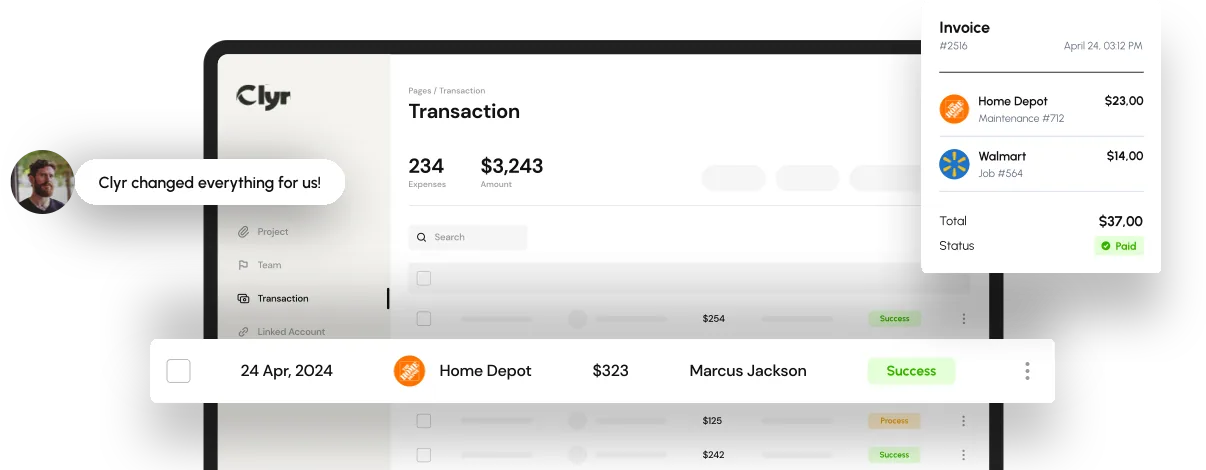

Managing construction or field-service operations comes with a unique financial challenge: tracking every purchase, material cost, fuel charge, and receipt across several locations at the same time. When teams are spread out and buying supplies on the go, expense tracking becomes more complicated than a simple spreadsheet can handle. The bigger the company grows, the faster mistakes, delays, and cost overruns appear.
This guide breaks down the most practical ways to manage expense tracking across multiple job sites and explains how modern tools like Clyr bring clarity, automation, and consistency to a process that is notoriously chaotic.
Key Takeaways
- expense tracking across multiple job sites requires structure, consistency, and real-time visibility.
- Manual processes often lead to missing receipts, inaccurate job costing, and delays in financial reporting.
- Automated systems help teams capture receipts instantly, categorize transactions correctly, and reduce administrative workload.
- Using a dedicated platform like Clyr improves accuracy, eliminates double entry, and ensures every expense is tied to the correct job.
- Better expense tracking leads directly to improved profitability and tighter cost control on every project.

Why Expense Tracking Becomes Difficult with Multiple Job Sites
Tracking expenses is simple when a business operates from one location. Things change quickly when teams work across three, five, or twenty job sites at once. Each site has its own purchases, its own staff, and its own unexpected spending patterns.
Common challenges include:
- Receipts that never make it back to the office
- Employees forgetting which job a purchase belongs to
- Delayed reimbursement requests
- No real-time visibility into spending
- Job costing that becomes inaccurate or incomplete
- Multiple cards being used across different teams
The result is an expense tracking system that becomes reactive instead of proactive. Costs pile up, data becomes scattered, and financial managers struggle to understand which site is profitable and which site is draining resources.
This is why modern contracting and field-service companies shift to automated solutions it reduces manual work and makes expense tracking predictable and error-free.
Method 1: Set a Clear Expense Tracking Workflow for All Job Sites
Before choosing tools, companies must define a simple, universal workflow. Even the most advanced software cannot fix disorganized internal processes.
A strong workflow includes:
- How employees should submit receipts
- Which types of purchases are allowed without approval
- Spending limits per role or per job
- Naming conventions for job codes
- Rules for fuel, tool purchases, and materials
- A timeline for submitting expenses
Standardizing these steps dramatically improves expense tracking because the same structure applies to every job site. This eliminates the guesswork that leads to inaccuracies and inconsistencies.
Method 2: Require Real-Time Expense Capture
When expenses are logged days or weeks after the purchase, the company loses control over two things: accuracy and timing.
Real-time capture means employees submit receipts the moment a purchase happens. This is only realistic when the system is easy to use, fast, and accessible on mobile devices.
This is where tools like Clyr provide value. Field teams can snap a photo, send a quick SMS or email, and the receipt is instantly stored, categorized, and ready for approval. The speed of this process makes expense tracking both efficient and reliable across every job site.
Real-time capture prevents:
- Lost receipts
- Misreporting
- Guessing which job a purchase belongs to
- End-of-month bottlenecks
It also gives management a current view of spending instead of waiting for delayed reports.
Method 3: Use Automatic Categorization to Improve Job Cost Accuracy
Manual categorization is a major source of errors in expense tracking. Field workers do not think in chart-of-accounts terms. They simply buy what they need and move on to the next task. Categorizing incorrectly even slightly can distort job costing.
Automated systems use AI to categorize expenses based on:
- Vendor type
- Purchase description
- Amount
- Historical patterns
- Job assignment rules
This level of intelligence is essential when tracking expenses across multiple job sites. It keeps financial data consistent and eliminates hours of manual coding.
Platforms like Clyr learn from previous inputs, becoming more accurate over time. This brings long-term stability to expense tracking and reduces the chance of miscoding materials, tools, or fuel purchases.
Method 4: Implement Job-Specific Cards or Job Codes
Every job site should have its own clear identity within the expense tracking system. Companies can either assign:
- physical cards per job
- virtual cards
- or job codes employees must select when submitting receipts
Job-specific identifiers make expense tracking much easier because:
- Purchases naturally group together
- Reports become clearer
- Overspending becomes visible faster
- Managers can compare job performance more accurately
The goal is to make it nearly impossible for an employee to submit an expense without assigning it to a job. This structure prevents confusion and protects the integrity of job costing.

Method 5: Use a Cloud-Based Expense Tracking Platform for Full Visibility
The biggest weakness of manual expense tracking is a lack of real-time visibility. By the time the finance team sees the numbers, the job may already be over budget.
Cloud-based platforms give managers access to:
- Up-to-date expenses
- Live transaction notifications
- Job-by-job spending comparisons
- Automated and accurate reporting
- Receipts organized in one location
When using a solution like Clyr, expense tracking becomes centralized. Every site’s purchases appear in the same dashboard, categorized and ready for review. This eliminates the need for multiple spreadsheets or email threads.
Cloud visibility also helps companies:
- Avoid duplicate purchases
- Catch overspending early
- Improve budgeting accuracy
- Make decisions faster
- Reduce administrative back-and-forth
This level of clarity is essential when handling several job sites simultaneously.
Method 6: Automate Approvals and Reduce Backlog
Approvals are often the slowest part of expense tracking. Supervisors may be busy on-site and do not check emails regularly. Employees may wait days before purchases get approved.
Automation solves this by:
- Sending instant notifications
- Routing expenses to the right person
- Automatically approving purchases under a certain amount
- Creating a clear trail for audits
Automated approvals keep job sites running smoothly and eliminate the weeks-long backlog that often occurs at month’s end.
Method 7: Integrate Expense Tracking With Accounting Systems
Manual data transfer is one of the biggest time-wasters in expense tracking. When companies use spreadsheets and email to track expenses, the back office must enter the same information into accounting platforms like QuickBooks or Xero.
Integrations eliminate this duplication.
With a tool like Clyr, transactions sync automatically. Every categorized expense flows directly into the accounting system, ensuring:
- No double entry
- No transcription errors
- Faster month-end close
- Better reporting accuracy
For companies operating multiple job sites, this integration makes the entire financial workflow truly unified.
Method 8: Use Real-Time Alerts for Better Spend Control
Real-time alerts inform managers when:
- an unexpected purchase occurs
- spending approaches job limits
- a card is used outside of approved vendors
- a receipt is missing after a transaction
This keeps expense tracking aligned with budgets. Managers can intervene earlier and adjust decisions based on current spending, not outdated data.
Real-time alerts protect the company from:
- overspending
- unauthorized purchases
- misuse of company cards
They also encourage accountability across the field workforce.
Method 9: Centralize All Job Site Expenses in One Dashboard
When companies rely on multiple spreadsheets, they end up with fragmented data. A centralized system consolidates everything:
- job site purchases
- receipts
- reimbursements
- vendor charges
- fuel expenses
- material costs
A single dashboard allows management to view expense tracking at a company-wide level and a job-specific level simultaneously. This improves decision-making and long-term planning.
Method 10: Review and Audit Job Site Expenses Regularly
Even with automation, regular reviews are essential. Weekly or biweekly reviews help:
- catch unusual spending
- track budget performance
- adjust job estimates
- keep teams accountable
Automated systems provide clean, organized data, making these reviews far easier than manually sifting through receipts and spreadsheets. This completes the expense tracking cycle and ensures data remains reliable.
FAQs
By using mobile receipt capture, automated categorization, job-specific codes, and real-time dashboards. These tools reduce errors and speed up reporting.
Frequent purchases, travel between sites, missing receipts, and delayed submissions make manual processes unreliable and time-consuming.
Yes. Automated systems categorize expenses consistently and assign them to the correct job, improving financial clarity and preventing budget overruns.
Clyr offers real-time receipt capture, automated coding, and seamless integrations, giving contractors a smarter way to manage expenses across multiple job sites.
Absolutely. Automation eliminates manual data entry, approval delays, and the need to chase receipts, allowing teams to focus on high-value work.